Key Takeaways
Created with AI - we're still experimenting, so apologies if it misses the mark
- The Galaxy Book6 Series, unveiled at CES 2026, features Intels Core Ultra processors for enhanced performance, advanced cooling systems for quiet operation, high-contrast displays, optimized speakers, and long-lasting battery life for all-day use.
- The series emphasizes security with Samsung Knox, Windows 11s Secured-core PC security, and durability testing to meet Samsung standards. Samsung Care provides accident coverage.
- The Galaxy Book6 Pro model showcases improved heat management compared to its predecessor, as well as a faster charging speed and an SGS-certified display for reduced blue light.
- Cross-device connectivity is a key feature of the series, allowing seamless integration with Galaxy6 devices, Windows PCs, and select Samsung Smart TV models. Some features require specific software updates and device compatibility.
Recommended products
This page contains affiliate links. As an Amazon Associate, we earn a commission from purchases made through these links.



Samsung
Samsung Galaxy Book6 Series Unveiled: Power, AI, and Design Innovations for Enhanced Productivity
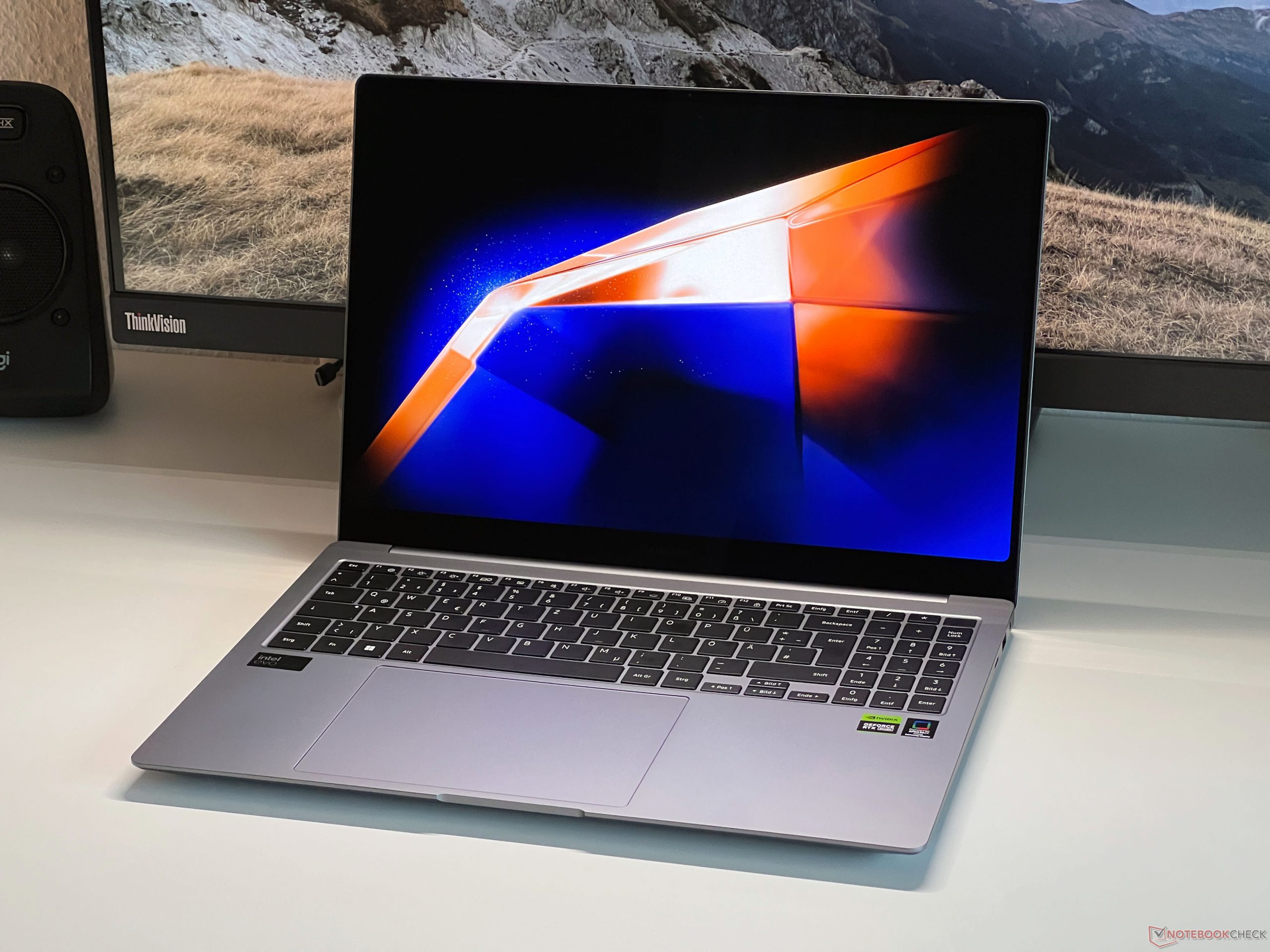
At CES 2026, Samsung introduced the Galaxy Book6 Ultra, Pro, and standard models, which the company calls its most powerful Galaxy Books to date. According to Wonjoon Choi, President and COO of Mobile Experience RD at Samsung, the Book6 series combines speed, power, and AI to deliver enhanced productivity and creativity. The Galaxy Book6 series seamlessly blends technology and design, featuring Intel’s Core Ultra processors built with 18th gen Intel tech. These laptops offer fast processing, efficient multitasking, and intelligent AI experiences. Samsung has incorporated an advanced thermal system with vapor chambers and airflow into the ultraslim Galaxy Book6 Ultra and Pro models, marking the first time these features have appeared in the Pro series. The Samsung Galaxy Book6 series features long-lasting battery life and improved energy management for all-day use. The Ultra and Pro models have vibrant screens that deliver vivid images with high contrast and sharpness, minimizing reflections. The models also include optimized speaker placement for balanced audio, clear voice during meetings, and deep bass for media.
Enhanced Security and Performance in Galaxy Book6 Series: Intel Core Ultra Processors, Smart Cooling, High-Contrast Displays, Optimized Speakers, Long-Lasting Battery Life
The Galaxy Book6 series emphasizes reliable and secure performance. Samsung Knox provides multi-layered security to block threats in real-time, complemented by Windows 11’s Secured-core PC security. Each Galaxy Book6 undergoes durability testing to meet Samsung standards, and Samsung Care provides accident coverage. The Galaxy Book6 Ultra and Pro will be available in Gray or Silver starting in late January 2026, with an Enterprise Edition for managed IT environments arriving in April 2026. Additional information is available on the Samsung Global Newsroom and Samsung.com. Key features include: Intel Core Ultra Series processors for fast performance. Efficient cooling system for quiet operation. High-contrast display for clear visuals. Optimized speakers for balanced audio. Long-lasting battery with smart energy management for all-day use.
Optimized Galaxy Book6 Pro with Enhanced Heat Management and Intel Core Ultra Processors
The laptops have dimensions of 357.1 x 248.0 x 14.9 mm (without touchscreen) and a 16-inch anti-glare IPS screen with WUXGA resolution (1920 x 1200) and 350 nits brightness. The amount of available storage space depends on pre-installed software, location, file size, and type. CPU and GPU specifications also differ by model and region. The Intel Core Ultra Series 3 processors are compatible with Copilot PCs; more information is available at intel.comperformanceindex. Intel’s trademarks are owned by Intel Corp. or its subsidiaries. Samsung’s tests showed that the Galaxy Book6 Pro had a 35% improvement in heat management compared to the Galaxy Book5 Pro 16 with Intel Core Ultra 7 (Series 2) 258v. Performance varies based on model, usage, and environment.
Enhanced Charging Speed and Blue Light Reduction in Galaxy Book6 Pro’s SGS-Certified Display
Samsung’s tests showed that a 65W charger charged the Galaxy Book6 Pro from zero to 2% in about two minutes. Battery life was tested by playing fullscreen 1080p videos in Windows players (such as Media Player and Movies & TV) with brightness set at 150 nits, headphones plugged in, airplane mode enabled, and keyboard lights off. Battery life and charge speed depend on settings, network connection, and usage. The Galaxy Book6 Pro’s AMOLED display is SGS-certified for reducing harmful blue light, with more details at sgs.comperformance. The Vision Booster feature requires HDR mode to be turned off. UL tests were performed on standalone panels, not as part of a set. Samsung’s Galaxy AI features are currently free, but future updates may include additional paid features or services. Third-party AI resources may have different terms. Refer to Samsung’s current Terms and Conditions under Advanced Intelligence services for more information. An internet connection is required for Galaxy AI, and service availability depends on location, language, and device. Some languages may require a downloadable pack, and AI Select may require an initial app download and installation. The following conditions are required for connected device features:
Seamless Cross-Device Connection with Galaxy6 Devices and Windows PCs
Each device must be connected to the same Samsung account with WiFi and Bluetooth enabled. Updated Galaxy smartphones or tablets must run One UI 7 or later, kernel version 5.15 or higher. Laptops must be Galaxy Book2 (Intel) or Galaxy Book4 (Arm) and above. Select Samsung Smart TV models (U8000 and newer) released after 2025 are compatible. Feature availability varies by device and region. To connect a Galaxy device to a Windows computer, use the Microsoft Phone Link app on the PC and follow the setup instructions, which include signing into the same Microsoft account. The Galaxy link is pre-installed on some devices. The PC must run Windows 10 or later. The phone and computer should be on the same WiFi network for a stable connection. Some phone apps do not share content with other screens. Touch controls require a sufficiently sensitive screen. To use nearby device features: The Samsung phone, tablet, or PC must be logged into the same Samsung account, with WiFi and Bluetooth enabled. Galaxy smartphones or tablets must have One UI 7 or later.
Unified Multi-Device Experience with Galaxy6 and Beyond, Requirements and Limitations Explained
The Galaxy Book requires the app from the Microsoft Store, Samsung Settings 6.0 (ARM) or higher, and Samsung Continuity Service 1.13 or higher. Each device requires its own Samsung account registration and connection to the same WiFi network. Multi Control requires Galaxy phones or tablets running One UI 5.1.1 or newer, Galaxy Book series devices from 2021 onwards, Samsung Settings V1.5 (Intel) or V3.3 (Arm), and Smart TVs or monitors from 2024. Copy and paste functionality may not work on all device models or apps, and availability varies by region (unavailable in the People’s Republic of China). To optimize device performance, connect both devices to the same Samsung account. The Galaxy Tab S10 Ultra and Galaxy Book5 Pro are sold separately. This feature is available on select Samsung Galaxy Tab models (S10, Ultra, S9 series, and Active4 Pro with One UI 3.1 or newer) and Samsung Galaxy Book series devices running Windows 10 2004 or later. Some features are only supported on Galaxy Book devices, and certain apps may not function due to content protection protocols. Samsung Care details vary by country. Samsung Electronics Co., Ltd. is the manufacturer.
In Case You Missed It
Ready to give your gaming or workstation setup the ultimate Christmas upgrade? Carlos Mendoza’s latest post, “Discover Samsung Monitors to Transform Your Setup This Christmas” (published December 23, 2025), has got you covered. Dive into this insightful piece to explore Samsung’s newest monitors, which combine top-notch performance with stylish design. From high refresh rates to ultra-fast response times, these advanced displays cater to every user’s needs. But here’s the cherry on top: exclusive offers await at shop.samsung.com/br – just use coupon code Natalssg. Transform your setup into a spectacular showcase of innovation this holiday season! Discover Samsung Monitors to Transform Your Setup This Christmas
Have any thoughts?
Share your reaction or leave a quick response — we’d love to hear what you think!
-
 0
0
-
0
-
0
-
0
-
0
-
0


